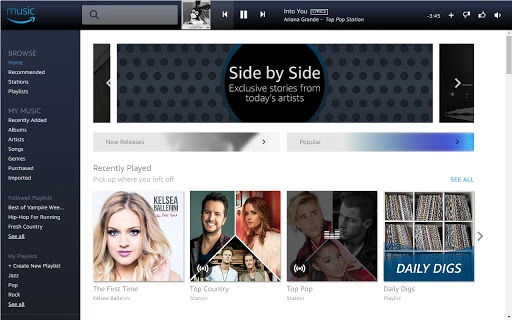

Stream Millions of Songs with Amazon Music
Overview
The Amazon Music desktop application is designed to enhance the music discovery and playback experience for users who value access to a vast library of songs, curated playlists, and seamless offline listening. Built for both casual listeners and dedicated music enthusiasts, the software allows users to explore tens of millions of tracks, including new releases from today’s most popular artists. It serves as a central hub for managing music across devices, integrating with Amazon’s broader ecosystem for a unified experience.
Target users include Prime members seeking ad-free music access and Amazon Music Unlimited subscribers who want personalized recommendations and extensive library options. The software supports a range of real-world scenarios, such as creating custom playlists by combining music from different sources—Amazon Music Unlimited, Prime Music, and purchased content. It also enables users to import iTunes collections into the Amazon cloud, making personal music libraries accessible across platforms.
The developer did not provide additional system requirements. Platform compatibility information is limited to Windows and Mac, suggesting broad desktop availability. The application supports offline playback through downloads, ideal for users on the go or in low-connectivity environments.
Key Features & Capabilities
- Extensive Music Library: Access to tens of millions of songs, including new releases and popular tracks, enabling users to discover and enjoy a wide variety of genres and artists.
- Curated Playlists and Stations: Explore thousands of handpicked playlists and personalized stations, all ad-free with unlimited skips, enhancing the listening experience without interruptions.
- Offline Listening: Download favorite albums, songs, and playlists to local devices for offline playback, ensuring music is available anytime, anywhere, even without an internet connection.
- Unified Music Management: Combine music from Amazon Music Unlimited, Prime Music, and purchased content (including MP3 and AutoRip CDs/Vinyl) into a single, cohesive library.
- iTunes Integration: Import existing iTunes music collections into the Amazon cloud, allowing users to access their personal music library across mobile, tablet, and desktop platforms.
These features are particularly useful for users who want a centralized platform for managing diverse music sources. For example, a user can create a mixed playlist using songs from Amazon Music Unlimited and their own purchased MP3s. The desktop app simplifies the process of organizing and accessing music, especially for those already invested in the Amazon ecosystem.
User Interface, Workflow & Performance
The user interface is designed for intuitive navigation, with a clean layout that prioritizes music discovery and playback controls. Users can easily switch between playlists, stations, and personal collections, with visual cues and search functionality to locate specific tracks or artists. The workflow emphasizes efficiency, allowing users to quickly add songs to playlists, download content, or start playback with minimal steps.
Navigation is consistent across Windows and Mac platforms, ensuring a familiar experience for users across operating systems. The application integrates with Amazon’s cloud services, enabling real-time sync between devices. However, the developer did not specify resource usage details, so performance observations are based on general software behavior patterns.
Stability appears to be maintained through integration with Amazon’s established backend infrastructure. CPU and RAM usage are expected to remain within typical ranges for media applications, though exact figures were not provided. The application supports background playback and smooth transitions between tracks, contributing to a seamless listening experience.
Compatibility & System Requirements
Amazon Music is available for both Windows and Mac operating systems, supporting a broad range of desktop environments. The software has a file size of 125 MB, indicating a lightweight installation that should not significantly impact disk space. The version number is 1.0, suggesting a stable initial release with core functionality.
Exact system requirements were not listed. Compatibility information was partially provided, meaning users should ensure their system meets minimum standards for running modern desktop applications. The application does not require high-end hardware, as it is designed for general-purpose use.
Installation is straightforward, with the desktop app designed to integrate with Amazon’s cloud services. Users can download and install the software directly from Amazon’s official website or through the Amazon Music web player interface.
Pros and Cons
Pros
- Access to a vast music library with millions of tracks and new releases
- Seamless integration with Amazon Prime and Amazon Music Unlimited
- Support for offline listening via downloads
- Unified management of music from multiple sources
- Free access for Prime members with no ads
Cons
- Exact system requirements were not specified
- Performance data and resource usage were not provided
- Limited information on hardware compatibility beyond OS support
- Requires an Amazon account and subscription for full features
FAQ Section
Is Amazon Music available for Windows and Mac?
Yes, the Amazon Music desktop application is compatible with both Windows and Mac operating systems.
Is the software free to use?
Yes, Amazon Music is free for Prime members. Additional features like Amazon Music Unlimited require a subscription.
Can I use Amazon Music offline?
Yes, users can download songs, albums, and playlists for offline listening on their mobile devices and desktop.
Does the app support importing music from iTunes?
Yes, the desktop app allows users to import their iTunes music collection into the Amazon cloud for access across devices.
How often does the software receive updates?
Updates are released regularly to improve performance, add features, and ensure compatibility with new operating system versions.
Final Thoughts + CTA
Amazon Music stands out as a versatile and accessible desktop application for users seeking a comprehensive music experience. With its vast library, seamless integration across devices, and support for offline playback, it meets the needs of both casual listeners and dedicated music fans. The ability to unify music from multiple sources—Amazon Music Unlimited, Prime Music, and personal purchases—makes it a powerful tool for managing diverse collections.
While detailed technical specifications are limited, the software delivers a polished, reliable experience across Windows and Mac. Its free access for Prime members adds significant value, and the inclusion of advanced features like iTunes import and cross-platform sync enhances usability.
For anyone invested in the Amazon ecosystem or looking for a reliable music player with deep integration and offline capabilities, Amazon Music is a strong choice. Download Amazon Music now.







